
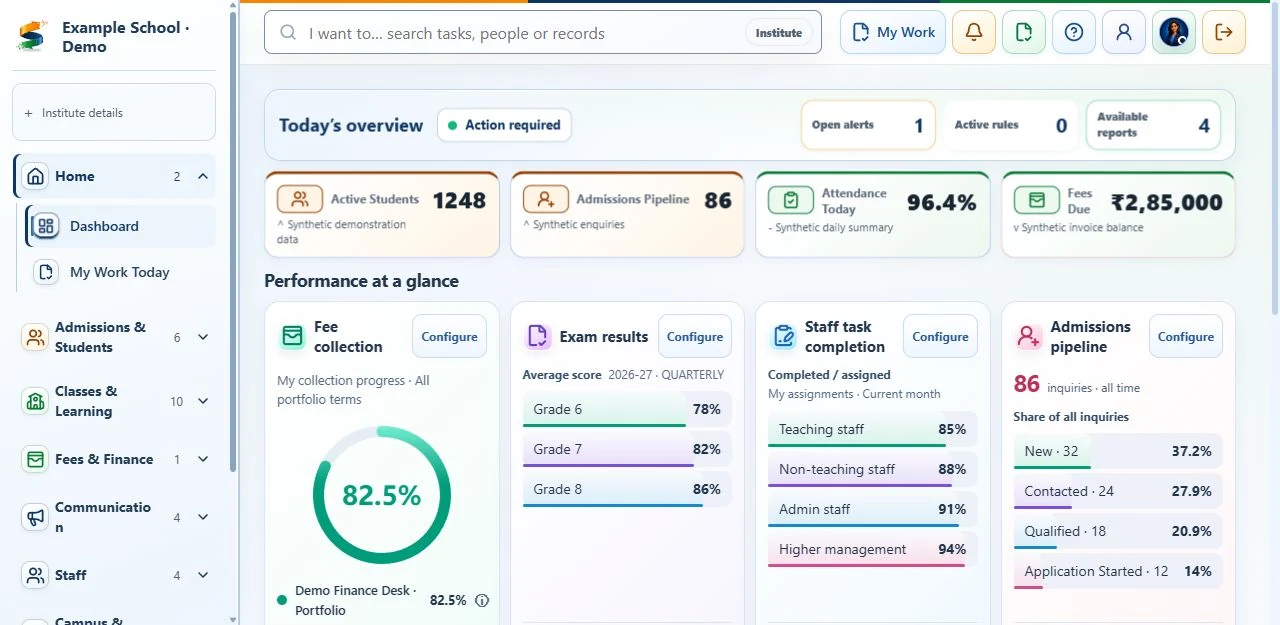
School management software should connect the work behind the school day.
School management software is a digital system for organising student administration and day-to-day institutional work. A school ERP usually goes further by connecting those records to finance, approvals, communication, reporting and governance. Vendors use the labels differently, so the name matters less than the complete workflow your team can demonstrate.
For an Indian school, compare how a system handles the ordinary path and the difficult exception: a missing admission document, a locked attendance correction, a fee adjustment or a user who should be denied access. This produces a more reliable buying decision than comparing feature counts.
Daily usability
Teachers and administrators should find the next task without searching advanced settings.
Connected records
Admissions, student records, attendance and fees should share permitted student details without duplicate entry.
Management visibility
Principals and accounts teams should see pending issues, responsible staff and approval history—not only summary totals.
Planned implementation
Agree setup, data transfer, training and approval checks before each process goes live.
School ERP should reduce coordination work, not create another reporting burden.
Each staff role should see the tasks it needs. Management sees issues needing attention; administrators control access and setup.
One operating record
Move from inquiry to enrolled student without repeatedly entering the same identity and guardian details.
Issues shown first
Show missing documents, attendance corrections, payment issues and unanswered messages before routine records.
Clear staff responsibility
Assign each approval, follow-up and issue to a staff role, with a due date or status and a record of actions taken.
Check staff use
Introduce processes in stages and verify that staff can complete them before activating the next module.
Evaluate the decisions your school leadership needs to make.
A useful school ERP review brings the principal, trust representative and finance lead into the same discussion. Agree who owns each operating decision, then ask for a demonstration that includes the exception and its resolution. These scenarios make the evaluation specific to your school or group.
Principal: review an attendance correction
A teacher requests a correction after attendance is locked. Check who can review it, what reason is retained, and how the family receives an accurate update within the agreed communication policy.
Finance Head / Accounts Team: explain a fee adjustment
Follow a concession request through approval, the student's amount due and the checking of account balances. Ask the accounts team to explain the decision from its records and confirm how it appears in the agreed reports.
Trustee: review school-level accountability
For a school group, list the decisions retained by each principal and those escalated to the trust. Ask the vendor to demonstrate the required access boundaries and reporting scope before assuming group-wide visibility is included.
Management: improve admissions follow-up
Use a sample inquiry with missing documents and an overdue follow-up. Check who is responsible and what happens next, then agree how to compare response time and progress with the school's current results.
Record what was demonstrated, any unresolved requirements and the person responsible for deciding in the ERP selection scorecard. Trusts that also operate higher education institutions can use the college and university ERP evaluation to assess their different academic requirements.
School departments should share records while respecting staff permissions.
Explore the six workflow areas
- Admissions and enrollment: inquiry capture, follow-up, application, documents, assessment, offer, acceptance and student creation.
- Student records: identity, guardian relationships, enrolment history, documents, support cases and a unified 360-degree view.
- Attendance: daily or period capture, corrections, date locks, leave impact, parent alerts and escalation evidence.
- Fees: structures, invoices, payment posting, concessions, refunds, receipts, reconciliation, finance close and ledger evidence.
- Communication: approved templates, audience rules, consent, quiet hours, delivery callbacks and retry controls.
- Governance: institute-scoped roles, permission approvals, audit trails, retention controls and export evidence.
Configuration must reflect the school, board, academic year and operating model.
Indian school requirements vary by board, language, campus and fee model. Before configuration, agree the academic year, classes, admissions stages, fee heads, receipt controls, attendance rules, communication consent and role ownership. These belong in one connected product, not disconnected custom screens.
Questions to settle during discovery
- Which three workflows create the most delay or manual reconciliation today?
- Which records are the official source, and what must be corrected before data is transferred?
- Which actions need principal, finance or administrator approval?
- Which channels do families rely on, and what consent or quiet-hour rules apply?
- What reports and evidence are needed for leadership, board or audit review?
Show daily tasks first, with advanced settings available when needed.
A dashboard suited to each staff role should show pending work, the person responsible and the actions available now. Keep daily forms and tasks easy to find. Make setup, history and downloads available through clearly labelled controls that also work with a keyboard. Guidance should explain the effect of an action without interrupting the task.
Protect school records and keep important changes reviewable.
Access restrictions must apply to records, downloaded reports, files and automated work—not just visible menus. For sensitive changes, record who made the change, when, why, and the values before and after it. Agree who is responsible for backups, restoring data, record retention, security incidents and administrator-account recovery before going live.
Use our staff-access and security checklist to decide which records and tests to request during evaluation.
Activate value in controlled stages.
Plan
Agree the results needed, responsible staff, source records, system connections, risks and approval checks.
Set up
Prepare the school structure, shared reference records, staff permissions and first priority processes.
Test
Check permitted and blocked actions with the relevant staff roles, using fictional or approved transferred data.
Go live
Complete the agreed checks, monitor staff use and expand only after stable operation.
What a school-management team should see in the demonstration.
Swipe for more columns →
| Area | Scenario | Evidence of readiness |
|---|---|---|
| Leadership | Today's priorities and responsible staff | Exceptions are visible without opening every module |
| Admissions | Inquiry through accepted offer | Mandatory gates prevent premature enrollment |
| Attendance | Attendance capture, approved corrections and parent-notification status | Locks, approvals and notification states are traceable |
| Finance | Invoice through reconciliation | Adjustments and close controls retain approval evidence |
| Security | Role change and restricted access | Blocked actions and change history match staff permissions |
| Adoption | New user completes one daily task | The next action is clear without specialist assistance |
For an evaluation framework authored by BharatCampus ONE, continue with the school ERP buyer guide and use the selection scorecard to compare demonstrated evidence. For commercial planning, review BharatCampus ONE pricing and total-cost assumptions.
Questions schools ask before choosing management software.
Is school ERP different from school management software?
The terms overlap. “Management software” often describes operational modules; “ERP” often implies connected records, finance, controls and reporting. Evaluate the demonstrated workflow and written scope instead of relying on the label.
How much does school management software cost in India?
Compare subscription, rollout, migration, integrations, messaging or payment-provider charges, support and future expansion. BharatCampus ONE publishes its school ERP pricing and total-cost assumptions so a school can review the baseline before a sales conversation.
What should a school request in a software demonstration?
Bring one new fictional student record and ask the vendor to show the usual process, an issue needing attention, an approval, a blocked action and the records kept afterwards. Use the checklist above and record the result in the education ERP selection scorecard.
How should a school plan implementation?
Agree the results needed, responsible staff, source records, access permissions, approval checks and support contacts before choosing a go-live date. The implementation checklist provides a structured starting point.