
Keep the record, owner and next action together.
From first inquiry to institutional insight
ERP features that connect schools, colleges and institutes.
BharatCampus ONE brings the operating day into one governed layer: admissions, academic structure, classroom work, student services, fees, communication, evidence and leadership visibility.
- One contextRecords, roles and actions stay connected.
- One daily viewTeams see the work that needs attention.
- One evidence trailApprovals and sensitive actions remain traceable.
BHARATCAMPUS ONE
Institution
operating layer Role-aware · Tenant-scoped · Evidence-ready
operating layer Role-aware · Tenant-scoped · Evidence-ready
01AdmissionsInquiry to enrolment
02AcademicsStructure to classroom
03FinanceInvoice to evidence
04Student lifeLearn, respond, progress
Surface exceptions instead of chasing every update.
Match actions to roles, approvals and institute boundaries.
Retain history when people, terms or responsibilities change.
Your institution, in its own language
Terminology that fits your institution
One platform model supports institution-specific terminology and operating rhythm. The configured profile keeps labels, academic structure and role context familiar to each team.
School
Classes & Sections
- People
- Students · Teachers
- Rhythm
- Periods · Terms
- Focus
- Attendance · Parent connection
College / University
Programmes & Semesters
- People
- Learners · Faculty
- Rhythm
- Courses · Academic terms
- Focus
- Progress · Governance
Training institute / Academy
Batches & Timings
- People
- Learners · Trainers
- Rhythm
- Modules · Schedules
- Focus
- Skills · Completion
Terminology and enabled workflow scope are confirmed during configuration so the rollout reflects the selected institution model.
A connected operating lifecycle
Connected operational workflows
Features are grouped around operational outcomes, not a catalogue of isolated screens. Each stage keeps the user, context, decision and evidence connected.
Attract & enrol
Build a cleaner path from interest to admission.
- Inquiry capture and owned follow-ups
- Application, documents and assessment gates
- Offer, enrolment and student-record creation
- Sales Field Office and pipeline visibility
Operational benefitFewer unowned follow-ups and a clearer view of where every prospective learner stands.
Structure academics
Configure the institution once, then reuse its context.
- Academic years, programmes, classes or batches
- Sections, timings, modules and schedules
- Faculty, teacher and learner mapping
- Master-data driven operational dropdowns
Operational benefitLess repetitive setup and fewer mismatched labels across academic workflows.
Run the day
Turn daily activity into a visible operating rhythm.
- Role-aware work queues and dashboards
- Attendance capture, exceptions and correction
- Classroom roster and contextual teacher actions
- Student service requests and follow-through
Operational benefitTeams spend less time assembling status and more time resolving the next exception.
Teach & support
Carry classroom context into the learning loop.
- Assignments, study material and visibility controls
- Text, document, voice and video evidence options
- Teacher review and learner progress context
- Inclusive cues and controlled assistance settings
Operational benefitA more consistent path from instruction to evidence, review and learner support.
Collect & communicate
Keep money and messages close to the right audience.
- Invoices, collections, adjustments and evidence
- Targeted announcements and class operations
- Acknowledgement-aware communication
- Student-facing messages and mobile access
Operational benefitClearer follow-up without broadcasting unrelated records or relying on disconnected channels.
Govern & grow
Make responsibility and evidence visible.
- Role-based access and institute data boundaries
- Approvals, reasons and audit trails
- Student 360 and leadership operating views
- Phased Smart Campus and intelligence readiness
Operational benefitLeadership can review decisions and expansion readiness without weakening day-to-day controls.
Classroom operations, made tangible
Classroom planning and teacher actions
The visual classroom carries academic context into teacher actions. Select one learner, a group or the whole room before opening attendance, assignment, visibility, communication or learner-profile workflows.
Take attendancePublish assignmentsControl visibilityCommunicateOpen learner context
The room layout and available actions follow the configured class, batch, permissions and rollout scope.

Student experience beyond the desk
The student mobile experience
A focused student mobile experience brings assignments, learning material and institutional messages into the same governed relationship as the core platform.
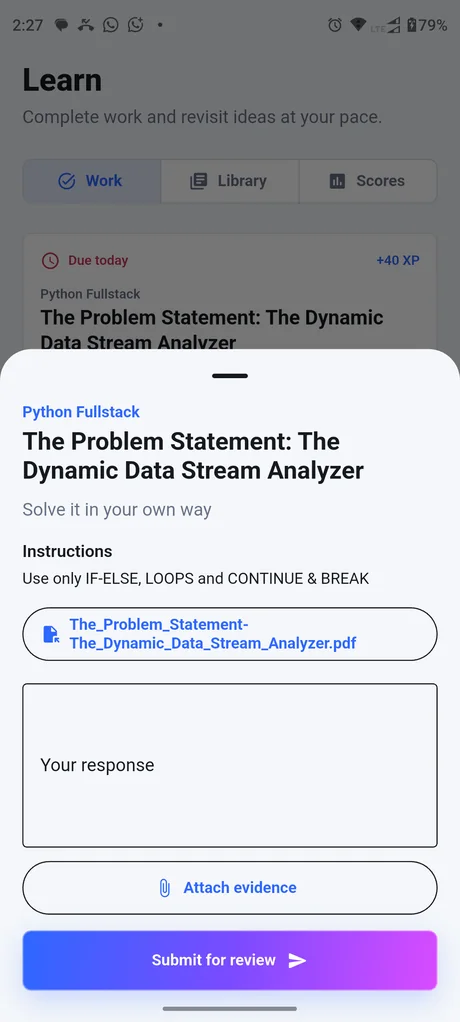
Respond with evidence
Open an assignment, understand the requirement and use the enabled response modes.
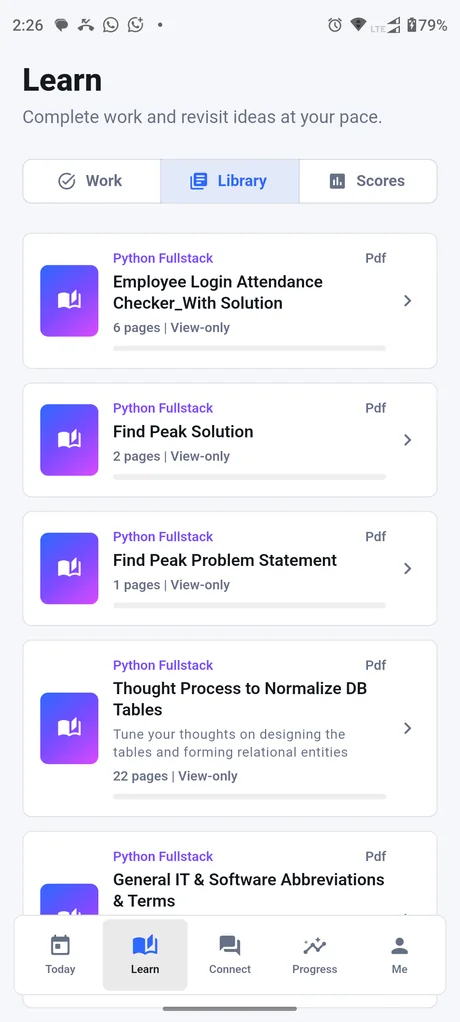
Find learning material
Access the relevant library and continue the learning path without searching across multiple tools.
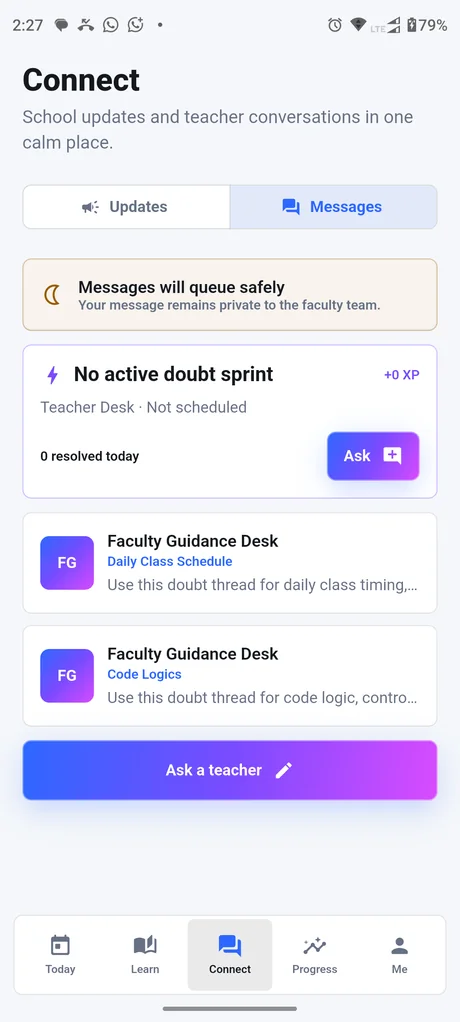
Stay connected
Keep approved student-faculty communication and institutional messages in context.
Student mobile distribution, enabled features and notification providers are confirmed for the selected rollout and release channel.
One platform, different working days
Relevant tools for each role
See the operating picture.
Review exceptions, evidence, financial visibility and adoption without collecting parallel updates.
Own the next follow-up.
Move inquiries through governed stages and preserve the reason behind each decision.
Keep records dependable.
Manage lifecycle changes, master data and institute structure with traceable controls.
Act from classroom context.
Move from a learner or group into attendance, assignments, communication and review.
Follow the money with evidence.
Keep invoices, collections, changes and follow-ups connected to the right record.
Receive relevant information.
Access learning, updates and acknowledgements without exposing unrelated institution data.
Why BharatCampus ONE
How BCO connects the institution
Most comparisons count modules. We focus on whether the daily workflow keeps its context, guardrails and evidence from beginning to end.
Institution-aware by design
Terminology, academic structure and roles adapt for schools, colleges, universities and training institutes.
Classroom context becomes action
A teacher can move from the room or learner into attendance, assignments, visibility and communication.
Student experience stays connected
Mobile learning and communication remain part of the governed institution relationship.
Control lives behind the screen
Tenant boundaries, permissions, approvals and audit evidence support safer institutional delegation.
Intelligence remains human-led
Signals can guide attention while authorised people retain the decision and its accountable record.
Adoption can grow in stages
Start with Foundation ERP, then add Smart Campus or Intelligence capabilities when the institution is ready.
A clear commercial boundary
Confirm your rollout scope
Final scope is recorded in the proposal, order and implementation plan. Core workflows are configured against institution context; connected providers, hardware, Smart Campus, intelligence and live-media capabilities are enabled only when the required readiness, consent and commercial checks are complete.
- DemonstrateUse synthetic or approved data to walk the end-to-end workflow.
- ScopeConfirm roles, integrations, data, ownership and acceptance gates.
- ActivateEnable each layer only after implementation readiness is evidenced.
Make the next conversation practical
Start with your priority workflows
Use the Health Check to identify the highest-value operating gaps, then bring those priorities into a focused discovery and product walkthrough.