BharatCampus ONE / School & campus management

School management software. One student record.
Across your school.

Link admissions, attendance, classwork and fees to the student. Give authorised staff the details to follow up, answer a parent’s question and explain an important change.

Tell us which school process you want to see. We’ll arrange the demonstration by email.

Admissions · classroom · accounts

The same student.
A connected school team.

Illustrated campus with admissions, classroom and accounts teams connected around one student record
From admissions to classroom learning and fee collection.

One connected student recordShared across the teams that run your school.

  • 01AdmissionsApproved offer → student enrolment
  • 02ClassroomClasswork → submission → teacher feedback
  • 03Fees & accountsFee collection → approved adjustment → balance history
  • 04School leadershipPending work → follow-up by the responsible team

Illustrated school processes. See the records, approvals and staff actions behind each step.

Private schools Colleges & universities Training institutes Inclusive schools School groups
A clearer view of your working day

See the day.
Find what needs attention.

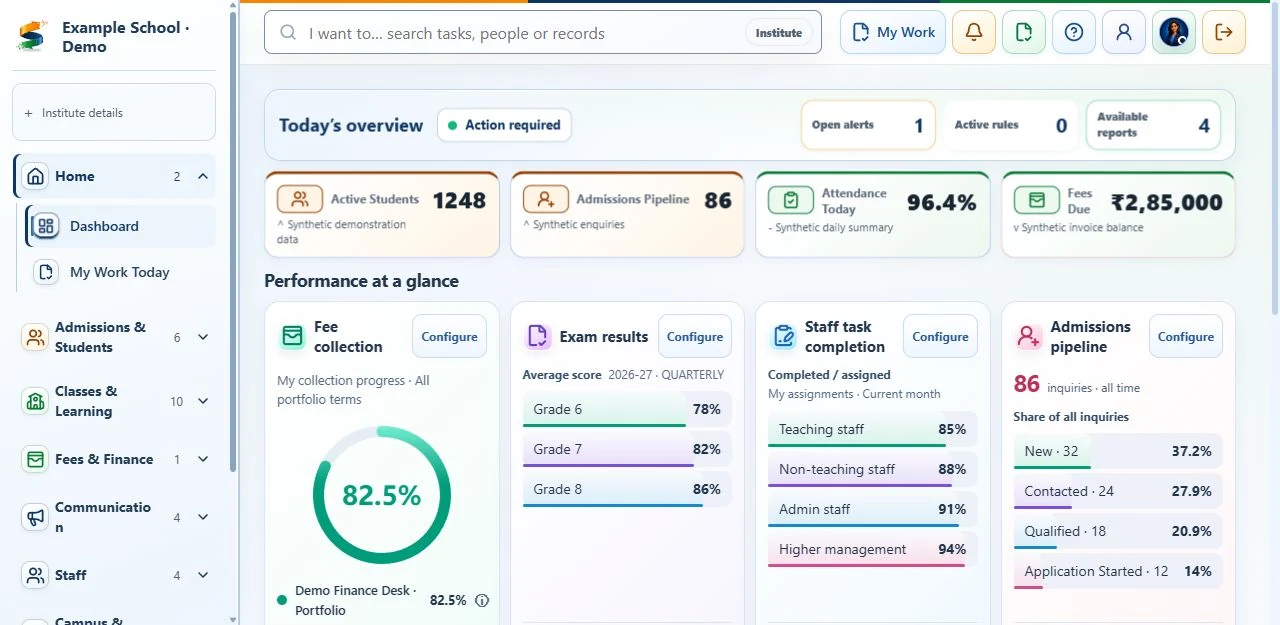
This product screen brings attendance, fees, admissions and pending tasks into view. Ask us to demonstrate the process your team needs to see.

Product view / 01 Institute Command Center Demonstration data
Current BharatCampus ONE admin dashboard with sample data showing attendance, fees, academic results, staff tasks and admissions

Review daily operationsSee attendance, fees and pending follow-ups.

Open the relevant recordReview its details before taking action.

Follow up with the right teamOpen the relevant task and see which team is responsible.

Current product screen with demonstration data. View the sample screen at full size

Request a demonstration
The moments that earn an institution’s trust

Everyday school management.
Made clearer.

Follow four school examples. See the problem, how BCO helps and what changes for staff, students and families.

01Admissions & student records

From application to student enrolment.

Illustrated admissions handover connecting a family's reviewed documents to a student record and a welcoming classroom
Illustrated school process · admissions details stay with the student record.
  1. 01 / The problem

    Details get entered again

    Families repeat details when applications, offers and student records are handled separately.

  2. 02 / BCO response

    Link admission to the student record

    Connect the reviewed application, guardian details and offer to the student record, with responsibility for follow-up.

  3. 03 / What changes

    Departments use the same record

    The next team can use the recorded details instead of asking the family to repeat them.

02Fees & accounts

Clear fee balances. Recorded approvals.

Illustrated campus finance team reviewing a parent's fee query, an adjustment and the linked account history
Illustrated school process · a fee adjustment stays linked to its reason.
  1. 01 / The problem

    The balance has changed

    An adjustment leaves families asking what changed, why, and who approved it.

  2. 02 / BCO response

    Review before applying

    Eligible corrections follow supported approval steps, retaining the reason and resulting account history.

  3. 03 / What changes

    Explain the amount clearly

    The accounts team can check recorded payments, approved adjustments and the remaining fee balance together.

03Classwork & student feedback

Assignments, submissions and teacher feedback.

Illustrated teacher preparing work, a student reading a watermarked document, and a teacher discussing feedback
Illustrated school process · teaching continues with submissions and feedback.
  1. 01 / The problem

    The work gets scattered

    A shared file alone cannot show what students submitted or which feedback they received.

  2. 02 / BCO response

    Connect assignments and feedback

    Teachers assign work, review student submissions and give feedback within the assigned class.

  3. 03 / What changes

    Students can follow their progress

    Students sign in to read supported view-only documents with personal watermarks and return to teacher feedback.

04Connected campus devices

Device alerts need someone to follow up.

Connected-campus concept with RFID and biometric readers, GPS transport tracking, a gateway and classroom sensors around a school
Illustrated solution · device integrations are separately ordered and tested for your school.
  1. 01 / The problem

    An alert needs action

    A missing attendance scan still needs review, a responsible staff member and an alternative way to confirm attendance.

  2. 02 / BCO response

    Plan devices and staff responsibilities

    Agree which devices to connect, the rules for reviewing their updates and who should follow up.

  3. 03 / What changes

    Launch with a tested setup

    Agree delivery dates and the checks your school must accept before the selected integration goes live.

Show us the admission, attendance or fee process your team wants to improve.

Request a demo
Explore before you decide

The details behind your school’s decision.

Check the software, the costs and the work involved in moving your school.

Choose what your teams need.

Foundation ERP covers admissions, student records, attendance, fees, announcements, materials, assignments and reports. Group administration manages institutions, staff access and responsibilities.

Smart Campus integrations and Intelligence services are separately ordered. Student-support indicators and follow-up decisions require human review.

Who can see and change a record?

Access for the right staff.
A record of important changes.

Your institution controls its records. Staff access depends on their assigned roles and permissions, sensitive changes have a recorded history, and sponsor reports use summaries rather than individual student records.

  • Separate institution data access, with platform and institution administration kept distinct.
  • Role-based access, approvals and recorded history for sensitive changes.
  • Clear privacy information, communication preferences and a route for data requests.
  • Sponsor reporting designed around aggregate outcomes, not child-level data access.
Access control Based on staff roles and permissions
Public links Registration only
Evidence Reviewable change history
Impact reporting Summary reports, not individual records
Published school ERP rates

School subscription, rollout and support costs

These rates apply to school deployments. Foundation ERP has a per-student rate and annual campus minimum; setup and provider costs remain separate. College and university requirements are reviewed separately.

Your first yearAnnual subscription one-time setup

Foundation starts at ₹2,50,000 before GST in year one: the ₹1,50,000 annual campus minimum plus ₹1,00,000 setup. Higher student counts and optional services can increase the total.

Adoption option

Managed Success

A named support contact, quarterly reviews of staff use, training sessions and priority initial assessment of support issues.

+ ₹90,000 / campus / year Added to the Foundation ERP subscription

One-time rollout: ₹1,50,000 + GST

Subscribe
Qualified evaluation

Decision Pilot

A 45-day evaluation of one agreed school process, using sample data, success measures and a scheduled review before deciding whether to subscribe.

₹75,000 / 45 days Fully credited to rollout on a qualifying annual order Purchase
Multi-campus

Network

For school groups needing central administration, campus-specific staff access and an agreed integration plan.

From ₹6,00,000 / year Rollout starts at ₹2,50,000 Request a proposal

Annual billing in advance. Prices exclude applicable GST. Messaging, payment providers, exceptional migration, commissioned integrations, devices and optional Smart Campus or Intelligence services are priced separately in your proposal.

See pricing and terms

Want to see the software before choosing a plan? Request a demo.

Technology with a purpose

Impact Access for under-resourced schools

Under-resourced schools can apply for essential access through the Impact Program, subject to eligibility and available support capacity. Sponsors, donors, NGOs and CSR partners can fund school digitisation and receive summary reports on use and outcomes.

Impact Access

Application-based access for eligible low-resource schools with essential workflows and annual review.

Sponsored Schools

Funded packages for beneficiary schools with aggregate dashboards and quarterly reporting.

CSR-ready framing

Education and special education can be framed as eligible project themes, subject to sponsor review.

Review your school's daily processes

School Operations Health Check

An optional, detailed assessment: 10 ratings across admissions, student services, finance, communication and leadership, plus institution and contact details. We use your answers to suggest what to discuss first, without asking for individual student data.


Just want to speak with us? Send the short enquiry instead; the Health Check is not required.

Open the optional Health Check10 ratings · institution details · suggested next steps
Loading diagnostic questions...
Let’s see how it fits your institution

Request a relevant demo.

Tell us about your school or college and the process you want to improve. We’ll reply by email to arrange the demonstration or answer your question.

No student data, payment or instant booking is needed.

Prefer email? Write to our team.

Introducing an institution? Contact us about the introduction.

Preparing the secure request form…

Add details about your request (optional)

A request, not a booking. We’ll confirm the next step by email.

What happens next
  1. Tell us your institution's name and how to reach you.
  2. We discuss the school or college process and services you need.
  3. See a relevant demonstration before any commitment.